Showing posts with label ipad. Show all posts
Showing posts with label ipad. Show all posts
Tuesday, March 10, 2015


Monday, March 9, 2015
Leaders Leading iPad Programs
I can across this article today from EmergingEdTech and it immediately resonated with me. We have been struggling with this exact situation in schools in our own region. Whenever you talk to teachers, especially those that have some first hand experience of iPad use in the classroom, this is one of the first things they say to you. Real change in schools needs to come from the top. This is a great article where Principal David Mahaley discusses their approach to iPad implementation. Make sure you check out the rest of the EmergingEdTech site for some interesting articles on eLearning and Educational Technology.


http://www.emergingedtech.com/2012/04/school-administrators-as-leaders-of-ipad-implementation-programs/
10 iPad Apps for Web Curation
Curation vs. Aggregation? Curation is such a necessity these days. The overwhelming wave of information we are exposed to is drowning us in facts and opinion. Not only do we need to be curating the information that we are consuming but we need to be insisting that our students have the skills and necessary tools in which to curate their own world. I have listed a number of capable curation apps that can help to do just that.
I tend to use more than one of these and in fact there are days that I would use three or four. Have a look at the ones that might feel right for you. I have a soft spot for Flipboard but only because it was the tool that first opened my eyes to the potential of the iPad in a classroom - I used it as a twitter fed "further reading" text for a senior art class. Enjoy!
 Pearltrees: FREE
Pearltrees is a place to collect, organize, discover everything you like on the web. The unique visual interface lets you keep everything you like at hand so you can organize it your way. Collect web pages and turn them into pearls. Organize your pearls into pearltrees based on your interests. Share all of this and start to cultivate your interests with Pearltrees.
http://itunes.apple.com/au/app/pearltrees/id463462134?mt=8
 Flipboard: FREE
Flipboard creates a personalized magazine out of everything being shared with you, from Instagram photos and Facebook updates to Tumblr posts and articles from your favorite publications. Connect Flipboard to all your social networks, and youll have a single place to enjoy, browse, comment on and share all the news, photos and updates that matter to you.
http://itunes.apple.com/au/app/flipboard/id358801284?mt=8
 Zite: FREE
Zite is a free personalized magazine for your iPad that automatically learns what you like and gets smarter every time you use it. Zite delivers all the great news, articles, blogs, and videos you want – and helps you discover new stuff that youll love. Get a head start on finding amazing content tailored just for you by automatically syncing Zite with your Twitter and Google Reader accounts.
http://itunes.apple.com/au/app/zite-personalized-magazine/id419752338?mt=8
 Scoop.it: FREE
Scoop.it lets you easily publish online magazines by curating content on your favorite topic. Curate on the go with the Scoop.it iDevice App. Select, edit and publish posts in the same engaging visual format as from the Web site. Review your suggestion list or add posts from Safari mobile then share on all your connected Facebook, Twitter, Tumblr... accounts.
http://itunes.apple.com/au/app/scoop.it/id487321972?mt=8
 HitPad: FREE
Hitpad delivers bite-size information snippets about the most important and worth-knowing topics of the day, highlighting why they are important and may be of interest, so you become current in no time and with very little effort. As you use Hitpad, it learns your interests in order to deliver you the most important information snippets in the areas that you care about.
http://itunes.apple.com/au/app/hitpad-see-whats-up/id422564565?mt=8
 Feedly: FREE
Feed your mind. Get the best content from your favorite websites delivered to your iPhone and iPad. Powered by Google Reader, Twitter, Tumblr, Facebook, Instapaper and Read it later. If you are an existing Google Reader user, you can think of feedly as a fast/visual overlay with lots for sharing options and seamless 2-way integration.
http://itunes.apple.com/au/app/feedly/id396069556?mt=8
 Pulse: FREE
Pulse takes your favorite websites and transforms them into a colorful and interactive mosaic. Tap on an article to see a clean and elegant view of the news story. Save stories for reading later across all platforms or sync them with Instapaper, Read it Later and Evernote. Sharing a story via Facebook, Twitter and email is as easy as two taps. Apple Design Award Winner 2011!
http://itunes.apple.com/au/app/pulse-news-for-ipad/id371088673?mt=8
 Flud: FREE
Beautiful design, simple user interface, and integrated social settings make Flud a great place to read your news. Customize Flud to your personal tastes. Follow all your favorite blogs and news sites, save stories to read when you have time or offline, connect with friends and other Fluders who share your interests.
http://itunes.apple.com/au/app/flud/id382544677?mt=8
 Google Currents: FREE - Not currently available in Australia
Google Currents uses Google search technology to build editions tracking the five most recent trending stories in categories such as world, entertainment, sports, science, and more. Each story is presented through a fresh edition of articles, videos, and pictures. Instantly, turn your Google Reader subscriptions, or any of your favorite blogs/feeds into a beautiful edition with a magazine feel.
http://itunes.apple.com/us/app/google-currents/id459182288?mt=8

Read more »
I tend to use more than one of these and in fact there are days that I would use three or four. Have a look at the ones that might feel right for you. I have a soft spot for Flipboard but only because it was the tool that first opened my eyes to the potential of the iPad in a classroom - I used it as a twitter fed "further reading" text for a senior art class. Enjoy!
Pearltrees is a place to collect, organize, discover everything you like on the web. The unique visual interface lets you keep everything you like at hand so you can organize it your way. Collect web pages and turn them into pearls. Organize your pearls into pearltrees based on your interests. Share all of this and start to cultivate your interests with Pearltrees.
http://itunes.apple.com/au/app/pearltrees/id463462134?mt=8
Flipboard creates a personalized magazine out of everything being shared with you, from Instagram photos and Facebook updates to Tumblr posts and articles from your favorite publications. Connect Flipboard to all your social networks, and youll have a single place to enjoy, browse, comment on and share all the news, photos and updates that matter to you.
http://itunes.apple.com/au/app/flipboard/id358801284?mt=8
Zite is a free personalized magazine for your iPad that automatically learns what you like and gets smarter every time you use it. Zite delivers all the great news, articles, blogs, and videos you want – and helps you discover new stuff that youll love. Get a head start on finding amazing content tailored just for you by automatically syncing Zite with your Twitter and Google Reader accounts.
http://itunes.apple.com/au/app/zite-personalized-magazine/id419752338?mt=8
Scoop.it lets you easily publish online magazines by curating content on your favorite topic. Curate on the go with the Scoop.it iDevice App. Select, edit and publish posts in the same engaging visual format as from the Web site. Review your suggestion list or add posts from Safari mobile then share on all your connected Facebook, Twitter, Tumblr... accounts.
http://itunes.apple.com/au/app/scoop.it/id487321972?mt=8
Hitpad delivers bite-size information snippets about the most important and worth-knowing topics of the day, highlighting why they are important and may be of interest, so you become current in no time and with very little effort. As you use Hitpad, it learns your interests in order to deliver you the most important information snippets in the areas that you care about.
http://itunes.apple.com/au/app/hitpad-see-whats-up/id422564565?mt=8
Feed your mind. Get the best content from your favorite websites delivered to your iPhone and iPad. Powered by Google Reader, Twitter, Tumblr, Facebook, Instapaper and Read it later. If you are an existing Google Reader user, you can think of feedly as a fast/visual overlay with lots for sharing options and seamless 2-way integration.
http://itunes.apple.com/au/app/feedly/id396069556?mt=8
Pulse takes your favorite websites and transforms them into a colorful and interactive mosaic. Tap on an article to see a clean and elegant view of the news story. Save stories for reading later across all platforms or sync them with Instapaper, Read it Later and Evernote. Sharing a story via Facebook, Twitter and email is as easy as two taps. Apple Design Award Winner 2011!
http://itunes.apple.com/au/app/pulse-news-for-ipad/id371088673?mt=8
Beautiful design, simple user interface, and integrated social settings make Flud a great place to read your news. Customize Flud to your personal tastes. Follow all your favorite blogs and news sites, save stories to read when you have time or offline, connect with friends and other Fluders who share your interests.
http://itunes.apple.com/au/app/flud/id382544677?mt=8
Google Currents uses Google search technology to build editions tracking the five most recent trending stories in categories such as world, entertainment, sports, science, and more. Each story is presented through a fresh edition of articles, videos, and pictures. Instantly, turn your Google Reader subscriptions, or any of your favorite blogs/feeds into a beautiful edition with a magazine feel.
http://itunes.apple.com/us/app/google-currents/id459182288?mt=8
News360: FREE
News360 for iPad aggregates more than 7000 different news sources around the web to bring you news stories in a concise and useful stream. The semantic analysis technology behind News360 allows you to get background information and dossiers about all the companies, people and locations that make the news, and to personalize the news based on your specific interests.
http://itunes.apple.com/au/app/news360-for-ipad/id420397564?mt=8
Cant Read that File on your iPad Bet you can with LeapDoc
How many times have you had the most brilliant idea for a lesson that will re-inforce an important learning outcome only to be thwarted by technology at the last minute. I think this has happened to all of us at one time or another, no matter how organised or prepared we think we are. This is a app that will make walking into a lesson or staff meeting a little easier. It is an app that converts files of any type into a PDF and then sends it directly to your iPad.
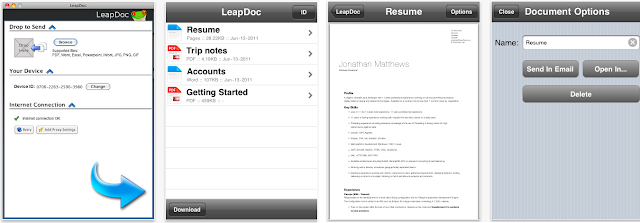
LeapDoc makes it much easier to get files such as iWork and MS Office documents to your iDevice. It instantly pushes files from your computer to your device. No emailing, syncing, wires or Wifi required.
But it actually does more than just that. Now you can read anything, anywhere, any time. There are many types of files iPhones and iPads usually cant open, for example...
What would make this an even better app is if it had the ability to write on the PDF documents once they were on your iPad. I hope the developers Deep Cognition might consider this as a possible future upgrade feature. It would make this the ultimate app for the classroom.
Read more »
LeapDoc allows you to take thousands of common file types, and quickly and easily converts them for viewing on your mobile device or iPad. Simply press print on your Mac or PC to automatically convert files to PDF and push them to your iPad.
LeapDoc makes it much easier to get files such as iWork and MS Office documents to your iDevice. It instantly pushes files from your computer to your device. No emailing, syncing, wires or Wifi required.
But it actually does more than just that. Now you can read anything, anywhere, any time. There are many types of files iPhones and iPads usually cant open, for example...
- Text files
- Project plans
- Graphic design files
- Desktop publishing docs
- CAD
- Databases
- and thousands of other common file types
LeapDoc even helps when youre not at your own computer. You can go to LeapDoc.com to push common file types to your device.
LeapDoc saves you the time and hassle of thinking about different file formats and makes sure your important files are always with you. It can help you vastly reduce the amount you print to paper at a fraction of the cost of a single printer cartridge.
Features include:
This is a handy app for those documents or files that the iPad does not support but that you really want to use with your class. It makes sense to have access to all of your files when you are on the go, especially on those days when you run from one class to another then on to a meeting all before lunch.LeapDoc saves you the time and hassle of thinking about different file formats and makes sure your important files are always with you. It can help you vastly reduce the amount you print to paper at a fraction of the cost of a single printer cartridge.
Features include:
- The ideal alternative to printing
- Read offline; documents are stored on your device
- Instant Push Alerts; no syncing, wires or Wifi needed
- Push common file types from the desktop app to your device with drag and drop
- Push common file types from the web to your device
- No extra costs; the print app for your desktop is free
- Open documents in other mobile apps with “Open In..."
- E-mail documents from within the app
What would make this an even better app is if it had the ability to write on the PDF documents once they were on your iPad. I hope the developers Deep Cognition might consider this as a possible future upgrade feature. It would make this the ultimate app for the classroom.
http://itunes.apple.com/us/app/leapdoc/id432148606?mt=8#
More Kindergarten iPad Resources
This is a great list of Apps and Websites that provide age appropriate content for Preschool and Kindergarten students. Put together by Dan King and Naomi Harm from Innovative Educator Consulting, these guys are iPad Content Integration Specialists and have worked extensively in sharing and promoting 21st Century Skills. This is the first of three pages of resources. Not only have they identified individual apps but they have also listed other useful websites that provide lists of apps and reviews. I am not a primary school specialist but this is a fabulous resource. Well worth a look for teachers or parent of very young children.

Read more »
http://www.danking.net/iPad/docs/pdf
Subscribe to:
Posts (Atom)